How the Nektar Impact LX mk3 Became the MIDI Keyboard That Stopped You Reaching for the Mouse
Nektar Impact LX mk3. The MIDI keyboard that earns its desk space through DAW integration, not gimmicks. Reviewed.
The MIDI keyboard market in 2026 is basically a graveyard of identical products distinguished primarily by the colour of their pads. Every brand ships the same rectangle with the same keys and the same faders, and the reviews all say the same thing, which is that it is fine. The Nektar Impact LX mk3 does something most of them do not, which is earn its place on the desk by removing the mouse from the workflow rather than adding another gadget to it.
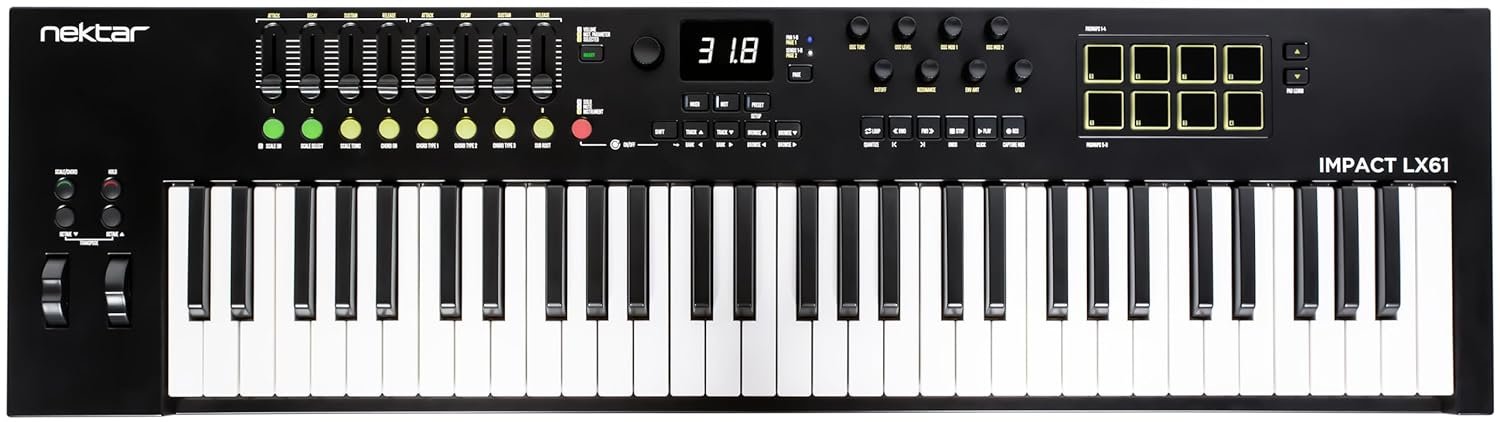
The mk3’s keybed has been redesigned across all four models. The 25, 49, and 61-key versions feature a synth-action keybed with a feel that punches above the price, while the LX88 uses a semi-weighted bed derived from Nektar’s GXP88. The control surface is identical across the range: nine full-resolution encoders, eight faders, eight velocity-sensitive pads, nine LED-illuminated buttons and twenty-two more besides, a quarter-inch footswitch jack, and USB-C. And here is the part that matters, the integration is where it separates from the graveyard.
Advantages
The DAW integration is genuinely transformative for producers who spend more time mousing through menus than playing. Custom profiles exist for Ableton Live Suite, Bitwig Studio, Cakewalk, Cubase 13 and higher, FL Studio, GarageBand, Nuendo, Logic Pro 10.8 and higher, Reason, Reaper, and Studio One 5 and higher. Transport controls, faders, and pads map automatically, and suddenly you are controlling the session from the hardware.
The linear DAW looper is the standout feature and the one nobody else has implemented this way. Hit the looper button, record a part, and the loop points set themselves automatically, truncated to what you actually played. You do not decide the loop length before recording. You play, and the hardware works out the boundaries afterward. For anyone who has ever lost an idea while configuring a loop region with a mouse, that inversion is worth the purchase price on its own.
NKS support means compatibility with thousands of Native Instruments and third-party plugins even in DAWs Nektar has not written a profile for. The new Scale, Chord, and Hold modes are aimed at players with limited keyboard technique, which is most guitarists and producers. The bundled software, a Komplete Select 15 edition, Bitwig Studio 8-Track, and MOK Miniraze, is not filler.
Disadvantages
The build is plastic, functional rather than premium, and it feels like a product engineered to a price rather than to a standard. Nothing rattles, but nothing inspires either. Players used to weighted keys will find the synth action on the smaller models light to the point of being unconvincing for piano parts.
The feature depth is also a double-edged thing. Between Preset mode, Setup mode, DAW integration mode, and NKS auto-switching, there are more operating states than a controller at this price usually asks you to remember. The manual is not optional. It is what it is at this price.
Use Cases
Home studio production: the 49 or 61-key model is the ideal centrepiece for a one-person setup, with enough fader real estate to mix without touching the mouse.
Live electronic performance: the pad and fader layout suits clip launching and mixing on the fly, and the Bitwig integration in particular is deep enough to run a set from.
Learning and composition: the Scale and Chord modes plus the semi-weighted feel make it a low-friction tool for sketching ideas before the mouse ever comes out.
Why the Nektar Impact LX mk3 Inverts the Loop Workflow
The linear looper is the feature nobody else has implemented this way and the one that justifies the purchase on its own. Conventional loop recording asks you to define the region first, then play into it, which means committing to a length before you know what the part wants to be. The mk3 reverses that order. You press the looper button, play, and the hardware sets and truncates the loop points to what you actually played, then begins playback so you can overdub immediately. Nektar’s own documentation describes artists no longer needing to decide loop length before recording starts. Anyone who has lost an idea while configuring a loop region with a mouse understands why that inversion matters more than any fader count.
Check out the MIDI Keyboard from Nektar’s Official Website.
If you are into MIDI Controllers, you might find this interesting. Why the Rob O’Reilly MIDI Pro 3 Is the Guitar That Keyboard Players Secretly Wanted

One Comment
Comments are closed.